


How much time can I use the free Personal Account?
WMS (Web Map Service) is an URL (like any other internet address or link) that allows to explore maps. If you type this URL in a browser like Chrome, you only will see an XML code, however, if you use a Map Viewer like IriMap, you wil be able to explore the map easily.
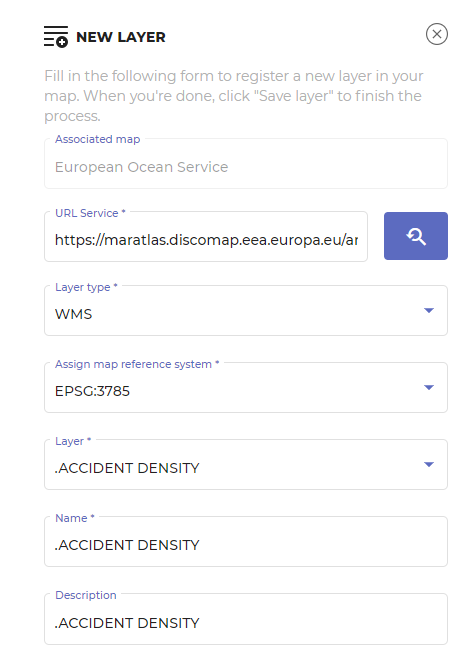
To use a Web Map Service WMS you have to copy the URL and paste it in the new layer dialog box. Then click the arrow to get service’s info, set up the layer name and save it.
I never boxed before can i do it?
Free Personal account is not limited in time. You can use it until you want to cancel it or to upgrade to the Professional account.
Can I publish a OGC Service?
No, at the moment, IriMap is only an OGC client, that connects to the thousands of OGC free services in the world
What kind of OGC Services can I connect to?
WMS and WMTS Services
Título del conmutador
Can Irimap connect to private OGC services within my organization?
Yes, as long as they are accesible from your browser. However, they will not work if you share the maps with persons outside your organization
Will IriMap be improved?
Sure! We are already working in the new version, with loads of great improvements
Why cannot I load a new layer?
The most common reasons are:
– The projection of the layer is not compatible with the map. Go back to Maps, edit the Map, and try another projection.
– The URL of the WMS is not secure. IriMap is a secured application, and it does not work with non secure protocols. For your protection, it only allows URLs that start with https.
– The URL is not correct. Copy the adress an paste it in the browser, to check that the URL works fine.